

Navigation / User Interface
Learn about what the main navigation sections and buttons do.
Surveys Navigation
When you click on the Surveys link from your participatory space's main page you will be greeted by this screen:
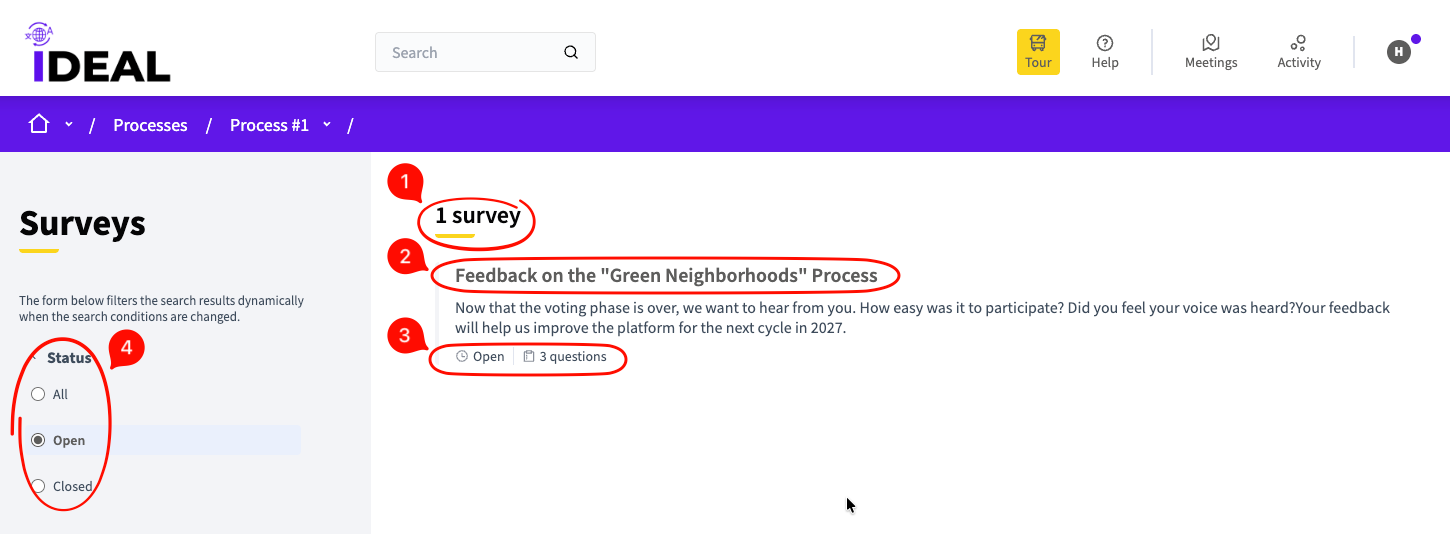
Number of surveys: Shows you how many published surveys there are in this participatory space.
Survey title: A link to the individual survey page where you can fill in your answers.
Status and questions: Shows you the status of the survey (Open or Closed) and how many questions there are within it.
Filter: Filter the published services by their status.
Survey Individual Page

Survey title: The title of this survey.
Survey description: A bit of text detailing what this survey is about / what purpose it will serve.
Questions: Here you will find the main questions for the survey. The ones required have the * symbol next to them on the right. The rest are optional.
Agree to terms of service: You have to click this to agree with the terms of service in order to submit your answers.
Submit button: Submit your answers to be included in the survey tally.